

1
Open Instagram App
Open Instagram App and choose the reel that you want to download
Download any public reels without any app or extension for offline usage
Follow below three steps to save your video for offline usage
Open Instagram App and choose the reel that you want to download
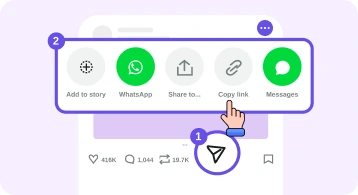
Click on Share and then from dialog click on Copy link.
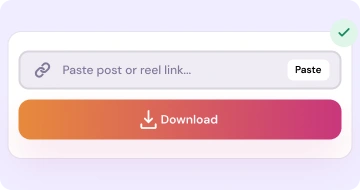
Open our Website and paste the link or click on paste button and click on Download button

Open Instagram on browser and open the reel that you want to download
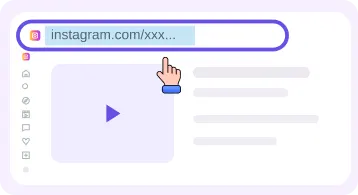
Click on Share and there choose the Copy Link option or just copy the URL from the browser addressbar that contains the /reel/ or /p/
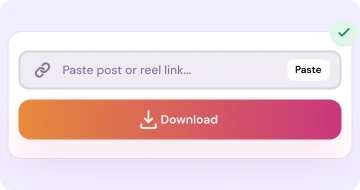
Open our Website and paste the link or click on paste button and click on Download button
How this tool work and where and when you can use and what the process all things explain below
Our Insta Reels Downloader tool takes the public reel link and it show you the preview of that reeel so that you can double confirm that it is the same reel or not. And then just click on download button and it will get started the downloading. No any extra step simple and straight forward.
There is no signup login system to use our website. No need of any extension, apk installtion or any fake waiting countdown timers. You can use that videos for offline viewing or for editing.
Reels are also named as short vidoes or vertical videos. Creator use our tools to make the backup of the files and student use it for there personal use for education purpose when they not have internet connection. You should download those videos that you have the right to keep it. For more you can checkout our reels guide.
As compared to other apps are software that you are dependent on to download and use them and doing signup login. Here our tool not required such thing. Simply and easy to use open in any mobile or desktop browser and use there. If any link not accepted to our website then just make sure that you use to correct link and no any extra space or word etc you added into the link. If still face then contact us and also further you can checkout our FAQ section also for any doubt.
If your purpose is only to get the audio from a video then you not need to downlaod the full video. There by the audio downloader tool by there you give your video link and it give you the mp3 file and that one you can use it.
You can also use our home downloader and there you can use all tools at single page. Just select the tab and corresponding link you will paste and use it. There will be no watermark. And you can download it FREE and UNLIMITED. For the pictures and video quality that it is provided by ig server. Which HD quality they provide that one we forward to you. For about legal notice you can checkout our terms and disclaimer pages. You can also download the igtv videos mean the long videos by the video downloader tool.
Quick answers for this tool. More questions on the full FAQ page.
Yes. IRD Downloader’s reel tool is free for personal use with no signup.
We aim to save the media file without adding our own watermark. Quality depends on what Instagram serves publicly.
Only if our server session can access them. Public reels work for everyone. See the FAQ.
In your browser’s default Downloads folder. Check the browser download list for progress.
Same IRD Downloader engine — pick the card that matches what you want to save.
Download Reels in MP4 without watermarks for offline watching
Open tool →Download feed short and long videos from public posts
Open tool →Download single images and multi images posts in HD quality
Open tool →Download a public account profile picture
Open tool →Browse a profile and download public posts and reels
Open tool →Convert reels and videos post to audio mp3 for offline hear
Open tool →