
1
Open Instagram App
Open Instagram App and choose the photo post that you want to download
Download Insta Carousel or photos of post one by one
Follow below three steps to save photos or carousel images from post for offline usage
Open Instagram App and choose the photo post that you want to download
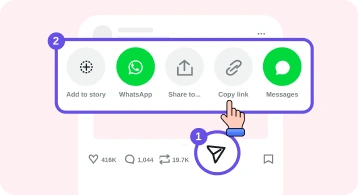
Click on Share and then from dialog click on Copy link.
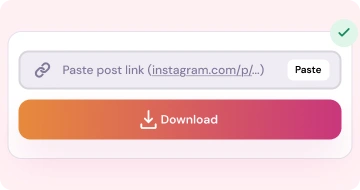
Open our Website and paste the link or click on paste button and click on Download button

Open Instagram on browser and open the photo post that you want to download
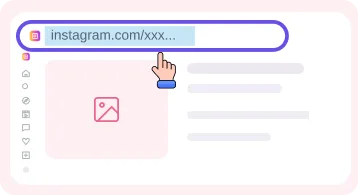
Click on Share and there choose it or just copy the URL from the browser addressbar that contains the /p/ (image type or carousel)
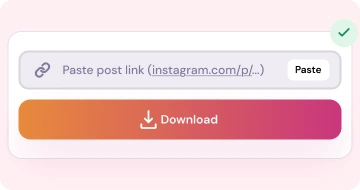
Open our Website and paste the link or click on paste button and click on Download button
How this tool work and where and when you can use and what the process all things explain below
This Instagram Photo Downloader loads a public post and list out all images either that post is single image type or multi image type. All ones you can download, You can preview as full screen and then also you can saved them. This current page is for specifically to download post insta images. If you want to use other tools to download insta data then go to our Home page and there you can switch tab and all tools you can use at single page.
Carousels are most common use by peoples for multi images as post. So there our tool helpout that instead of taking the app screenshot and then crop etc where quality is fully decrese here we provide the solution that you can download all images of that post also and download in HD quality with full size. You can arrange it into your folders by saving and use it for your personal projects, reference, collections or backup of your social data.
For downloading all data you can checkout our profile downloader tool where you will see all data and if you want to use the audio music only of a specific reel or video then use our Insta Audio downloader tool for this purpose.
We load images with our server as insta will block it. So when we have higher traffic then there is a chance if slow load but with your support we provide you the fast server service.
If any image is look distort, soft then first check the image into the full screen. And then download always. And also if there quality also same then mean that post has provide only one quality and the post image self has less hd.
Always use this tool for personal use, offline hearing, Donot use it for commercialize or any business purpose if you use the photos or videos without permission that can violate copyright and also you can checkout our disclaimer.
Always when you past the post link then just double check that you use the correct link and not adding any space in the url. And that post it should not private or deleted one. Always use the public post link. For any questions about our tools checkout our FAQ page. And if have any questions then contact us for further any clarification you can checkout our about us page and for read our articles go to the blog page.
For any doubt checkout below answers and still not satisfy then check our main FAQ page.
Yes you can see the images in full screen and checkout the quality of images and then you can decide to download. The same quality that you get on insta, Same you will get here.
You can download all images one by one. That bulk zip file download is coming soon.
Yes go to our homepage and there you will all tools so you can download the reels, vidoes, post images, multi-images, download audio only, and Dp.
Same IRD Downloader engine — pick the card that matches what you want to save.
Download Reels in MP4 without watermarks for offline watching
Open tool →Download feed short and long videos from public posts
Open tool →Download single images and multi images posts in HD quality
Open tool →Download a public account profile picture
Open tool →Browse a profile and download public posts and reels
Open tool →Convert reels and videos post to audio mp3 for offline hear
Open tool →